
What I Learned Building SFT from the Ground Up

Over the past few weeks, I implemented supervised fine-tuning (SFT) from scratch, continuing a series of projects where I'm building foundational LLM components as a learning exercise from the ground up. Previously, I've worked through implementing GPT-2 from scratch and writing LLM inference scripts from the ground up. Naturally, SFT was the next step in this series.
One thing I realized pretty quickly, writing the training scripts from scratch is not the most difficult part. However, making it actually work, producing results that seems reasonable is where the real challenge begins 😅. You run into all sorts of difficulties: debugging annoying errors, dealing with gradient instabilities, getting vLLM to cooperate for intermediate evaluation (especially with limited GPU memory) etc. These are the things that eat up your time but teach you the most.
In this post, I want to share not just what I built, but the building and debugging journey that got me there.
What I Built
I loosely followed Stanford's CS336 Assignment 5 as a guide, wrote all the SFT core components, and ran two sets of experiments:
1. Reasoning SFT: Fine-tuned Qwen2.5-Math-1.5B on math reasoning traces to improve step-by-step problem solving capabilities.
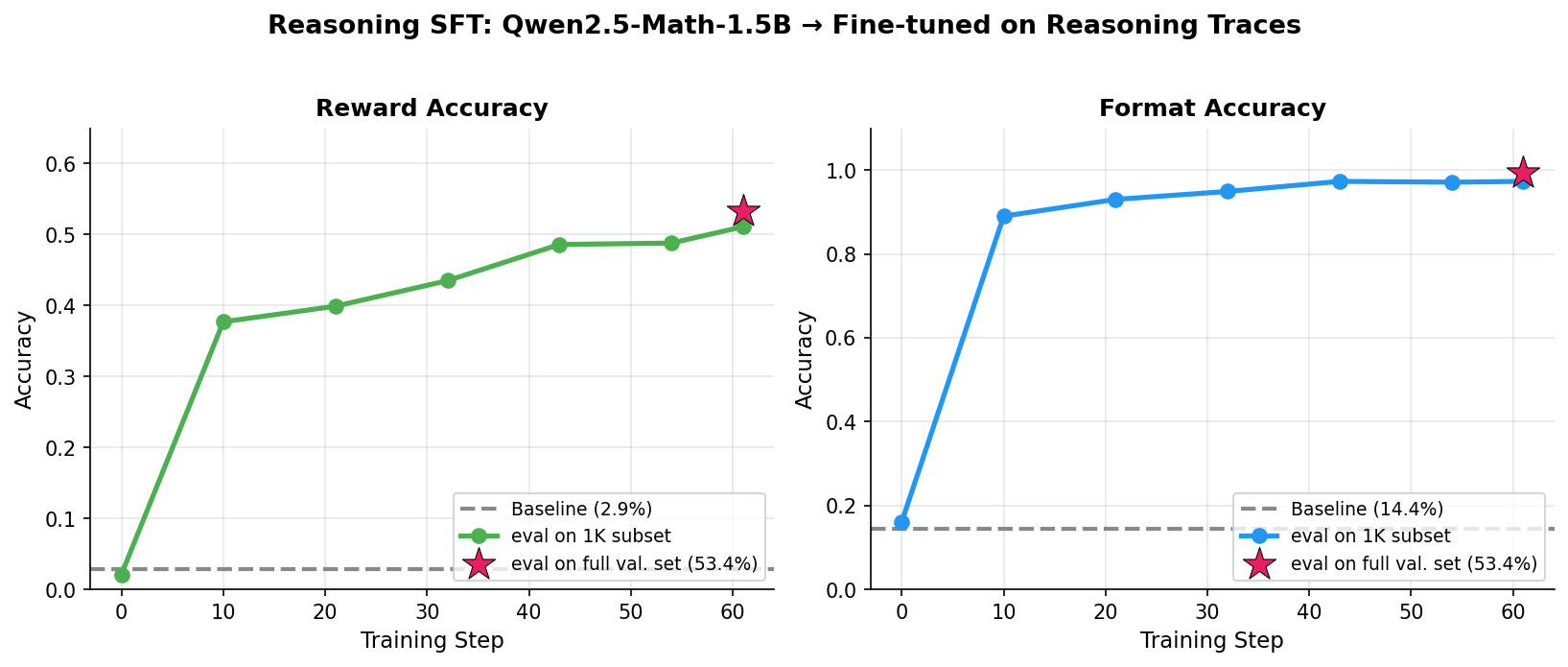
Best: 53.4% reward accuracy (up from 2.9% baseline) with 99.3% format accuracy
2. Instruction SFT: Fine-tuned Llama-3.1-8B on UltraChat-200K + SafetyLlama for general instruction following and safety.
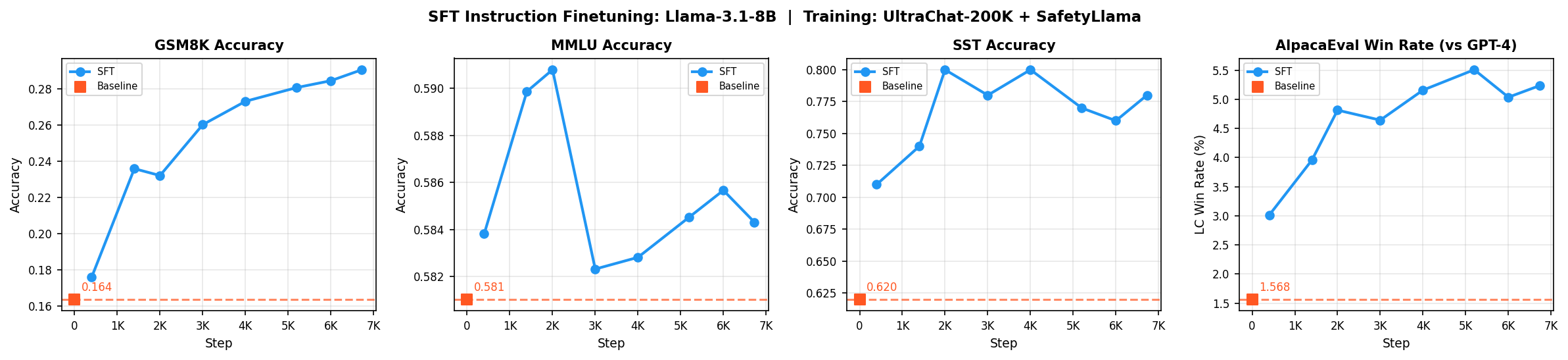
Best: GSM8K 16->33%, Safety 62->78%, AlpacaEval 1.6->5.3%, MMLU ~58%
All experiment code, training scripts, and detailed notes are available in my building-from-scratch repo.
Part 1: Reasoning SFT with Qwen2.5-Math-1.5B
The idea behind reasoning SFT is simple. You take a base model that barely outputs correct answers, show it high-quality examples of how to solve problems step-by-step, and train it to replicate/mimic that reasoning process. The model learns to think in a structured format with first generating reasoning inside <think> tags, then outputting the final answer in <answer> tags.
My starting point was Qwen2.5-Math-1.5B, which had quite poor baseline accuracies on the math validation set: ~2.9% for answers and ~14% for format.
Creating the Dataset: First Challenge
The original CS336 MATH dataset used for SFT training is not publicly available, so I had to create my own. My dataset creation pipeline had three steps:
Source problems: I used hiyouga/math12k dataset to create the training set, carefully filtering out any problems that appeared in the validation set to avoid data leakage.
Generate reasoning traces: The next and most important step is to generate the reasoning traces for each problem. I used
gpt-oss-120bmodel to generate them via Fireworks Batch Inference API. It costed me around ~$4 to generate the reasoning traces.Filter for quality: I also created a subset of around ~3.6K examples by filtering out the reasoning traces that led to wrong answers.
The Training Loop: Per-Token vs. Sequence Loss
The original assignment uses sequence level loss normalization where you sum the loss over all tokens in a sequence and normalize by a constant, not by the variable number of tokens.
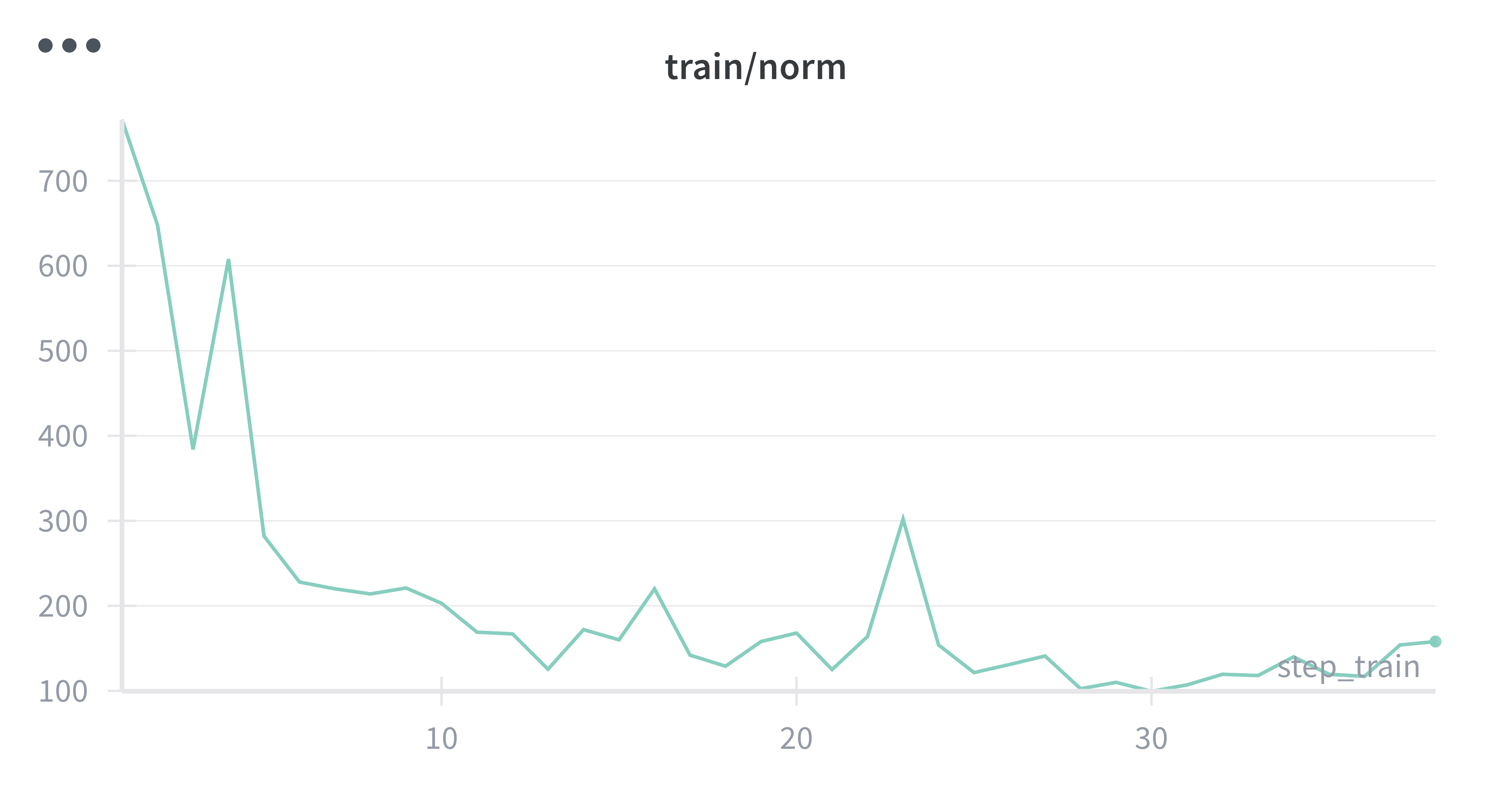
While running the initial experiments, I noticed the gradient norms were really large values, and training felt unstable. Even though the loss seemed to be going in the right direction, something didn't feel right. After some investigation, I realized the issue: with variable-length sequences (my training examples ranged from short to quite long), longer sequences contribute more to the gradient than shorter ones. This creates high variance in gradient updates.
 |
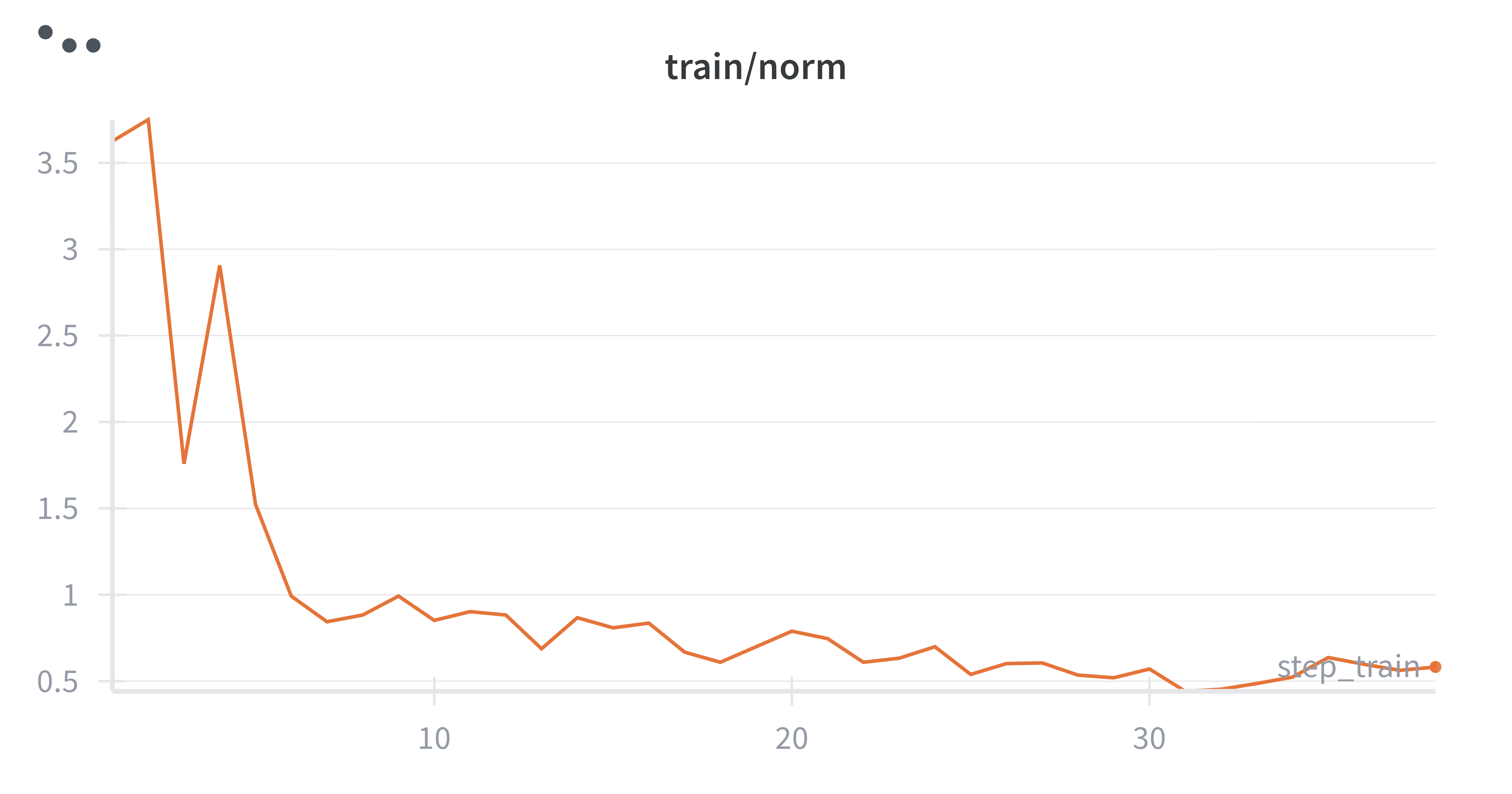 |
Left: Sequence-level loss (high variance gradients) | Right: Per-token loss (stable gradients)
Thus, I added a per_token_loss flag to my training step which when enabled normalizes the loss by the actual number of response tokens in each sequence. The difference was noticeable with subtle improved accuracy. More importantly, the gradients became much more stable with per-token normalization.
| Run | Loss Normalization | Reward Accuracy |
|---|---|---|
| run_filtered | Per-token | 0.5204 |
| run_filtered-res-len | Sequence-level | 0.5106 |
vLLM Integration: The Debugging Nightmare
Here's where things got really tricky and painful. I wanted to run intermediate evaluations during training using vLLM for fast inference. The assignment provided code for this but it was written for an older vLLM version and nothing worked out of the box 😅.
Problem 1: vLLM initialization changed
The assignment's approach used a separate GPU dedicated to running vLLM as an inference server. I wasn't keen on this setup anyway as it meant paying for an extra GPU just for inference. But more importantly, the approach broke completely with the vLLM version I was using (0.7+). The initialization logic had changed, and the old code just wouldn't run.
Solution: I switched to the colocate approach, running vLLM on the same device as the training model. I came across this in the excellent HuggingFace blog post on co-located vLLM. Though, this required being more careful about GPU memory (setting appropriate values for gpu_memory_utilization, max_model_len, and max_num_seqs), but it actually works and saves on GPU costs.
Problem 2: Missing model_executor attribute
When I tried to load updated model weights into the vLLM instance during training, I hit this error:
AttributeError: 'LLMEngine' object has no attribute 'model_executor'
This was really annoying because the attribute clearly existed in the vLLM source code. After much debugging, I found two solutions:
- Downgrade to vLLM 0.10.2, or
- If using vLLM 0.11.0, set the environment variable
VLLM_ENABLE_V1_MULTIPROCESSING=0at the start of the script
I went with the environment variable approach since I didn't want to deal with version conflicts.
Problem 3: The _orig_mod issue
With torch.compile enabled on my model (for faster training), loading weights into vLLM failed with the below error. The issue is that torch.compile wraps the original model and stores the actual weights under _orig_mod. When loading weights into vLLM, you need to access them through this attribute, not directly from the compiled model.
ValueError: There is no module or parameter named '_orig_mod' in Qwen2ForCausalLM
Solution: In my load_policy_into_vllm_instance function, I made sure to load from model._orig_mod when the model is compiled.
These three issues cost me almost a day. However, it was worth it because I learned a lot about vLLM and how to integrate it in training run
Results
After all that debugging, here's what the training runs achieved:
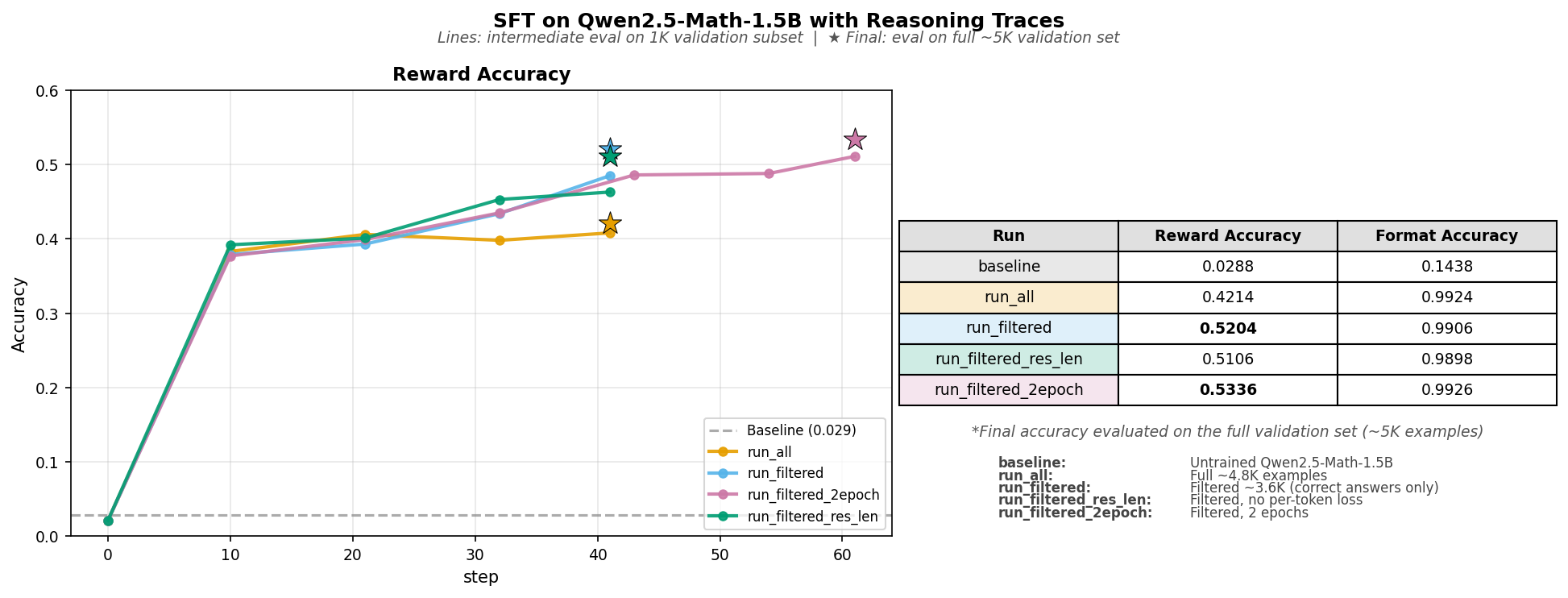
| Run | Training Data | Reward Accuracy | Format Accuracy |
|---|---|---|---|
| baseline | - | 0.0288 | 0.1438 |
| run_all | Full 4.8K (correct + incorrect) | 0.4214 | 0.9924 |
| run_filtered | Filtered 3.6K (correct only) | 0.5204 | 0.9906 |
| run_filtered-2epoch | Filtered 3.6K (2 epochs) | 0.5336 | 0.9926 |
Key takeaways:
- Filtering out incorrect reasoning traces boosted accuracy from 42% to 52%. Training on wrong traces teaches the model wrong patterns.
- The model quickly learned the output format (99%+ format accuracy after training).
- Running for 2 epochs gave a boost in accuracy though a marginal one.
Part 2: Instruction SFT with Llama-3.1-8B
With the reasoning SFT working, I moved on to the second part: instruction fine-tuning. This loosely follows the CS336 Supplementary Assignment 5, where the goal is to build a model that can follow diverse instructions and refuse harmful requests.
Unlike reasoning SFT, instruction fine-tuning uses conversational instruction-response pairs. The training data combines UltraChat-200K (diverse multi-turn conversations) and SafetyLlama (safety-focused examples) totaling around 200K examples, formatted using the Alpaca prompt template.
For evaluation, I used four benchmarks as specified in the assignment:
- GSM8K: Grade-school math problems (tests math reasoning)
- MMLU: Multiple-choice questions across 57 subjects (tests factual knowledge)
- AlpacaEval: Open-ended instructions judged by LLM-as-judge (tests instruction-following quality)
- Simple Safety Tests (SST): Harmful prompts to test refusal behavior (tests safety)
The Prompt Masking Implementation Problem
I wanted to experiment with prompt masking i.e. masking prompt tokens (labels = -100) so the loss is computed only on response tokens, helping the model focus on generating good responses.
Problem 1: BPE tokenization boundary issues
Implementing this led to an interesting debugging session. When I tokenized the prompt separately (ending with "### Response:\n") and compared it to the tokens in the full sequence (prompt + response), the boundary tokens didn't match. This is a known issue of BPE tokenization: subword merging behavior changes based on context.
My first instinct was to try to implement complex boundary detection logic. However, I thought let's try the simplest fix that works.
Solution: I decided to drop the last token from the prompt before masking. This is a bit quick fix. However, I might train on one extra formatting token (likely just a newline) but will never accidentally mask response tokens.
# Conservative fix: drop last prompt token to avoid boundary issues
prompt_length = len(prompt_tokens) - 1
labels[:prompt_length] = -100
Problem 2: Very short or empty responses
Another issue I ran into with prompt masking, some training examples had very short or empty responses. When all tokens are masked leaving only a few response tokens, the cross-entropy loss calculation can produce extreme values or NaNs.
Solution: The fix was simple. I filtered out examples with very short responses (0-2 words) from both training and validation sets.
Setting Up AlpacaEval
A quick note on the AlpacaEval evaluation setup. It uses an LLM-as-judge approach where an annotator model compares outputs from your mode against GPT-4 reference responses.
The assignment suggested deploying Llama-3.3-70B-Instruct locally as the annotator, but that requires at least two GPUs which is not cost effective (atleast for my case). Instead, I used Llama-3.3-70B-Instruct via Fireworks API. This required some config tweaking (API key mapping, judge configuration) but works well.
Results and Analysis
I ran two experiments: one with prompt masking (mask) and one without (no-mask).
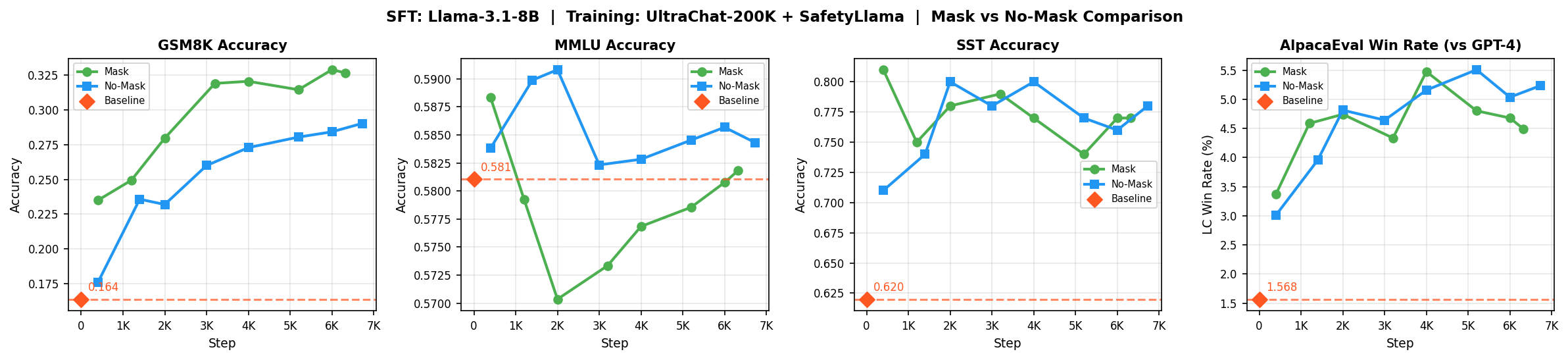
| Benchmark | Baseline | No-Mask | Mask |
|---|---|---|---|
| GSM8K | 16.4% | 29.0% | 32.7% |
| MMLU | 58.1% | 58.4% | 58.2% |
| SST Safety | 62.0% | 78.0% | 77.0% |
| AlpacaEval | 1.57% | 5.3% | 4.5% |
GSM8K (16% -> 29-33%): Both approaches significantly improved math reasoning, but masking helped more (32.7% vs 29.0%).
Safety (62% -> 78%): You see big improvement as expected since the training data includes SafetyLlama examples.
AlpacaEval (1.6% -> 5.3%): The conversational instruction-following improved substantially. Interestingly, no-mask performed slightly better (5.3% vs 4.5%). My guess: training on the full sequence helps the model learn overall conversational patterns and produce more naturally flowing responses that match the prompt style.
MMLU (~58% -> ~58%): This stayed flat and that's actually good news. MMLU tests factual knowledge which is encoded during pre-training. SFT teaches the model how to respond, not what to know. The fact that MMLU didn't drop means we avoided catastrophic forgetting issue.
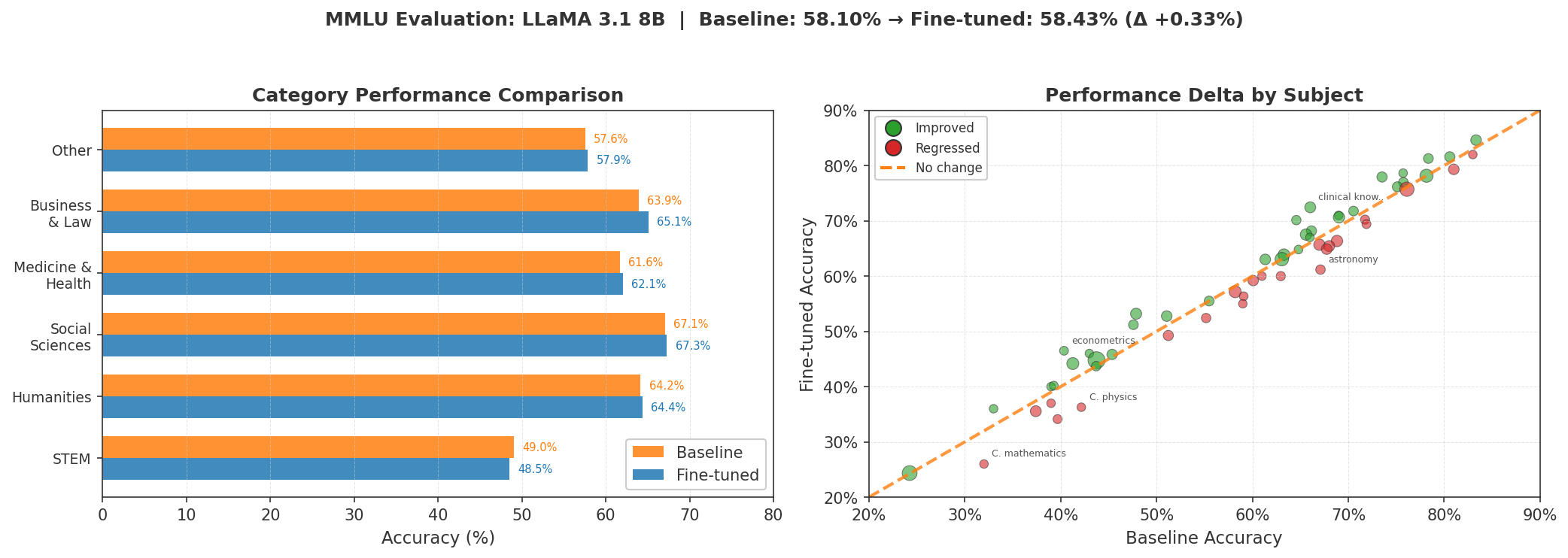
Looking at individual MMLU subjects, some regressed slightly (college math: 33% -> 26%) while others improved slightly, leading to near-zero net change.
Conclusion
While writing the SFT code from scratch, I ran into a lot of debugging challenges. It was at times painstaking and frustrating but was also a valuable learning experience. By debugging, I learned a lot about how things work under the hood, and the whole experience prepares you for how to go about debugging code/projects in the future.
I leave you with some of the debugging tips I came across:
- vLLM OOM: Tune
max_model_len,max_num_seqs, andgpu_memory_utilizationand start conservative. - Per-token loss: Normalize by response token count to prevent long sequences from dominating gradients.
- torch.compile + vLLM: Access weights via
model._orig_modwhen loading into vLLM. - BPE boundaries: Drop last prompt token before masking to avoid tokenization edge cases.
- Data quality matters: Filtering incorrect traces gave me a 10% accuracy boost.
- vLLM version issues: Set
VLLM_ENABLE_V1_MULTIPROCESSING=0ifmodel_executoris missing.
Resources
I have made all the code, datasets, and model checkpoints publicly accessible.
- Code: building-from-scratch/sft
- Datasets: garg-aayush/sft-cs336-assign5-datasets
- Checkpoints:
- Reasoning:
- run_all: qwen-2.5-math-sft-all-2epoch
- run_filtered: qwen-2.5-math-sft-filtered-2epoch
- run_filtered-res-len: qwen-2.5-math-sft-filtered-res-len
- run_filtered-2epoch: qwen-2.5-math-sft-filtered-2epoch
- Instruction d:
- run_mask: llama31-8b-sft-mask
- run_nomask: llama31-8b-sft-nomask
- Reasoning:
- Training logs: wandb/sft and wandb/sft_instruct